


When you sign up and create your first project we prompt you to select a preferred way of working with your tasks – lists or cards.
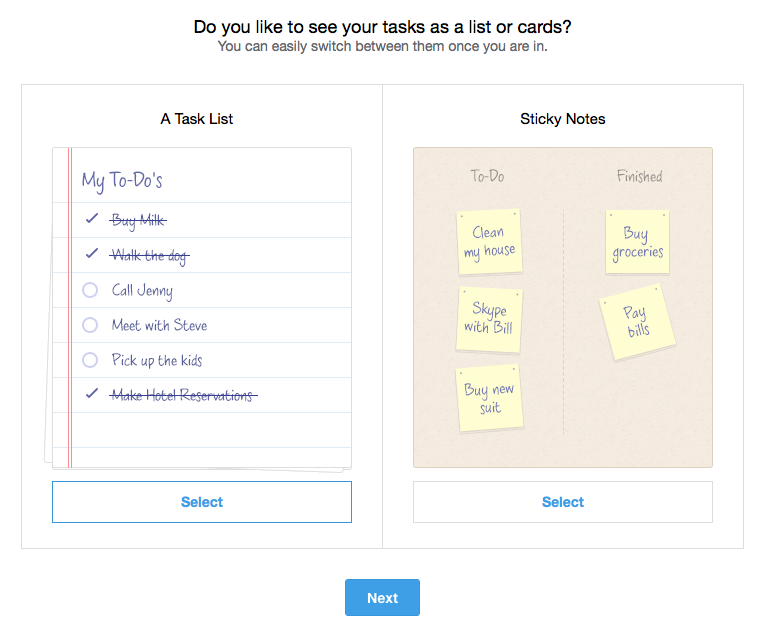
You can easily change between them to try it out.
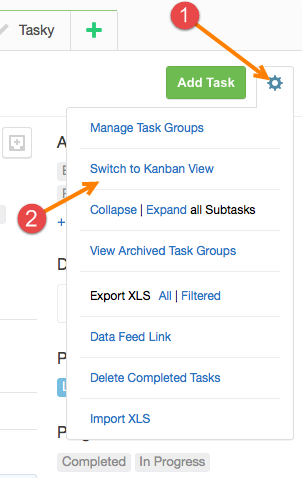
You will find a bunch of handy options as deleting completed tasks, archiving and export to XLS too.
Start your next project in two minutes
Freedcamp is free for unlimited projects, tasks and users. No credit card, no trial clock.
After the project is made, how do you switch to a Kanban from a to-do list?
Hi Chris,
Second picture in a blog post – go to To-Dos tab, click a button with arrow pointing down and select Kanban view. same actions to switch back to List view.
Cheers,
Igor
I just dragged a task from one group to another in kanban view, but the task snapped back to the original group when I changed views. Do you know what is going wrong here?
Hi,
Blog is not the best way to work on such things. Please email help@freedcamp.com with all your questions. I will respond from this email as well to resolve this.
Cheers,
Igor
HI, do you know how to show stick notes? I know how to change from list view to kanban but there is no sticky notes it is not as you show it.
Hi Pierre,
Sticky notes = Kanban in Freedcamp. We called them this way as many people do not know what Kanban is.
Cheers,
Igor