


Now you can export your Tasks, Milestones and Time Tracking records to XLS file to create custom reports or just print it for a meeting or a client meetup. We also added Milestones information into Tasks export file as, as you know, Tasks and Milestones are finally work together.
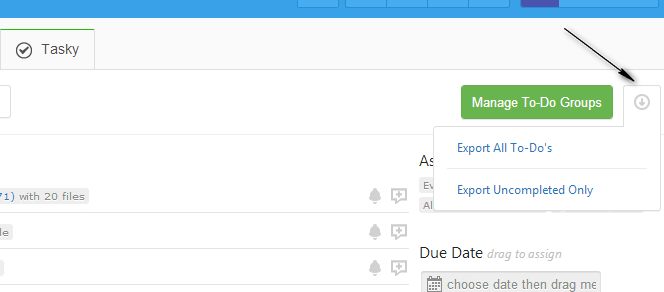
For your piece of mind we also provide full data backups. Note that files are not included into backups now but we will add them very soon.
Please also check recently added XLS import, which supports our free and pro versions of subtasks and fully compatible with export format.
Start your next project in two minutes
Freedcamp is free for unlimited projects, tasks and users. No credit card, no trial clock.
Finding Freedcamp really good but want to print a daily to-do list – looked at this post but can’t find any export option on your website and no print option. Please can you advise.
Hi Tom,
I responded directly via email.
Cheers,
Igor
I have several projects and need to print all the to do lists with details. Is this possible? How can I export more than one project at a time to XLS?
Hi Sarah,
We have export to XLS (all or filtered results) on global Tasks board which will export all projects tasks you can access to a single XLS file – https://freedcamp.com/dashboard/tasks
Check more about global boards here – http://blog.freedcamp.com/2016/01/21/set-your-home-page-in-freedcamp/
[…] Export from one project to import to another one can be used as temporary workaround to copy or move some tasks from one project to another. However, with this approach comments and attached files will not be copied since they are not part of our export XLS file. Native Copy/Move actions, which will support comments and attached files are coming later this year. You can export filtered results for a faster import into another project. […]
Hi Is there a way to export all time spent on all projects each month? i.e. total time for 10 projects or does it have to be done per individual project?
Thanks
Aaron
Hi Aaron
For now only here https://freedcamp.com/Freedcamp_LxR/Freedcamp_Devel_yOf/wiki/wiki_public/view/kYbab#export-global-time-records-to-global-task-board but we will add Time Board similar to Tasks Board in a few months time.
Regards,
Igor