


We use Time Tracking application in Freedcamp. Integration with To-Dos is coming soon but, for now, we added a few things, which greatly improve our own experience and we hope they will work for you too.
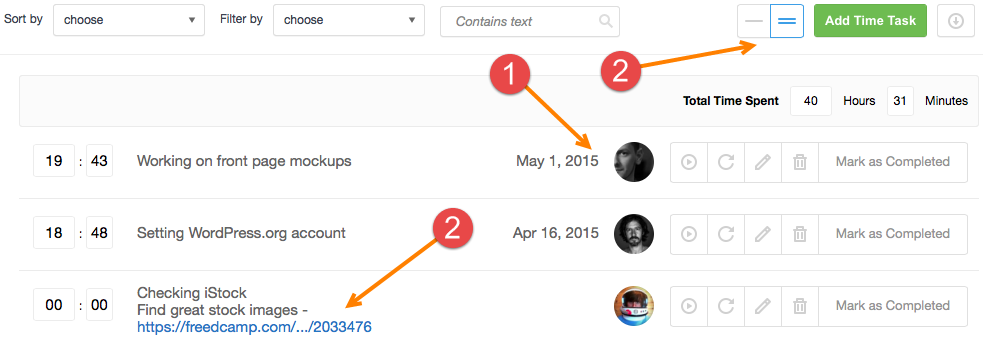
First of all, as you probably noticed, we act on your feedback and started increasing font sizes. This time you have bigger fonts in Time Tracking. We also added avatars, ability to optionally add a date (1) and support for multi-line descriptions (2).
When you create a new time entry, you can see a set of check-boxes with all tasks assigned to you (or ‘everyone’), which are ‘In Progress’ or were completed today.
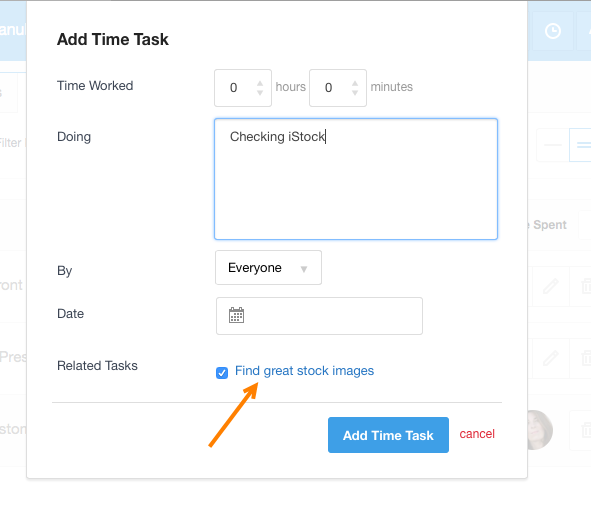
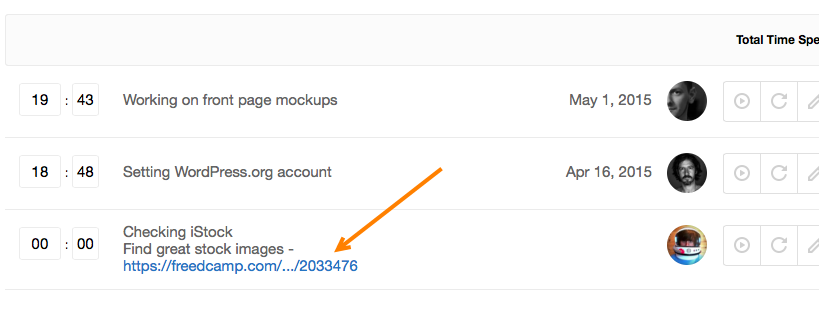
When you check a To-Do – we add its description and a link to it to your time entry.
Start your next project in two minutes
Freedcamp is free for unlimited projects, tasks and users. No credit card, no trial clock.
Great work, guys. The app is looking much better! I think we will have to switch back!
Thank you Dwayne.
Please do 🙂
This is great, thank you!
One wish though. I would like to know time used per to-do-task. Could it be possible to put the to-do-task in its own column in time-task Excel-file or add a time-task summary in the to-do details?
This will part of Time Tracking and To-Dos integration. You will be able just to add time per task or use time tracker to start, pause, resume and in the end add an entry which will be attached to a task your are working on.
I would really like to switch to this but, in the name of feedback, I would need a couple things:
– To be able to define the *type* of work completed, such as Development, Design, or Project Management
– To be able to view a report that included individual views of each of those custom types for the project.
With the current time-keeping service I’m using these often to measure the status of a project.
I love time management on the To Do level. However I also want to run some reports to run for better visibility –
1. Time spent by user each day on all projects
2. Time spent on a project.
3. Total hours of employees in a day/week/month
Above dashboards will be very useful for keeping 360 degrees visibility to billable time.
A previous user request that we would use as a core feature of freedcamp is this:
3. Total hours of employees in a day/week/month
More specifically the ability to run a report or perform an export for a date range on one or several employees, across one/several/all projects for the purpose of payroll. As important as it is to track time, I think more importantly is the ability to track overall payroll costs/project-payroll costs.
Is it possible to download a complete list of all projects and all time tracked without the need to pull the data for each individual project one at a time?
Hi,
Thanks for asking. Yes, we do want to add a page where administrators can pull all tasks or all time entries from all or selected projects with one click. Most likely it will be part of business plan/module but now we concentrate on other activities which will allow us to raise more funds from investors and be able to hire more people to do it.
I just want to be able to press a button a have it keep the time for me. Like a timer. Thanks
Hi Mike,
Do you mean Time Tracking and To-Dos integration?
Exactly what Chitiz has mentioned above: I also want to run some reports to run for better visibility –
1. Time spent by user each day on all projects
2. Time spent on a project.
3. Total hours of employees in a day/week/month
Above dashboards will be very useful for keeping 360 degrees visibility to billable time, otherwise it’s just meaningless.
Thanks everyone for providing valuable feedback. I will try to do my best to re-read this thread and post your ideas to http://freedcamp.uservoice.com but I can not upvote these ideas. Once you opened http://freedcamp.uservoice.com please do a search by ‘time’ and either post new feedback or add your extra info to a matching existing idea and upvote it.
This will help us a lot.
Thanks
Igor
Where can I find this “Add Time Task”?
Sorry, I’m new to this wonderful project management system and I’m not sure where to locate the Time Task.
Thank you Igor for all your time and efforts into this wonderful online tool
Jojo
Simply go to Marketplace select Time application, click ‘Install now’ you will be prompted to add Time application to existing projects.
For new projects – check last step of project creation wizard it prompts you to add more applications as we give you some defaults only.
Please email me if any questions help@freedcamp.com
[…] Quick Add, new Project Templates, redesigned Time Tracking. […]
Introducing date field is a good thing.
When done as we plan – each time entry chunk will be recorded as date/time started, date/time stopped + description. So you can run a time report for last month for all tasks including non completed and charge your clients – system will remember what time you charged but this part will need our Invoices application to be subscribed and added to your projects.
Loving this app and seeing all these detailed support documentation is awesome! Keep up the great work! Well done for everyone who has commented so far on the feedback too!
Hello,
is there a way to restrict the visibility of the time sheet to only the person account that is using it please?
I don’t want other people seeing my timesheet.
Thanks
Leo
Hi Leo,
I will email you what can be done.
Cheers,
Igor
“Leo Hugo says
Hello,
is there a way to restrict the visibility of the time sheet to only the person account that is using it please?
I don’t want other people seeing my timesheet.”
“Hi Leo, I will email you what can be done. Cheers, Igor”
I have the same issue. Any solution? Thanks in advance.
Greez-Sascha
You can limit access to Time in a project only to yourself but there are no private entries to allow each person to have access to Time but only see own time entries.
Other option is to use a separate project.
Cheers,
Igor
Hi, I feel so silly, but I can’t figure this out and I need help. I have invited someone to a project but it only shows Me and “everyone” in the project, not the person I invited (and who is in as a contributor). I can’t assign them to any tasks, because they don’t show up. What am I missing?
Thanks 🙂 Love Freedcamp so far!
Hi Debra,
No worries. I will give you step by step and respond from help@freedcamp.vom via email. Please feel free to use this email for any questions in the future.
Hi, do you have time tracking with random screenshot feature? I want to check what my coworker is doing within a working time frame.
Hi Robin,
Sorry we do not have this feature. Please check https://www.worksnaps.net
Regards,
Igor
I can’t see the Related Tasks checkbox. Does anybody know why?
Hi Mariusz,
Probably because one of the conditions it requires now is not met? “you can see a set of check-boxes with all tasks assigned to you (or ‘everyone’), which are ‘In Progress’ or were completed today.”
If not – please email help@fredcamp.com a link to a project and we will check.
Cheers,
Igor
Any way to show timers on the Kanban board to show the tasks actually being worked on presently?
Hi William
Once Time and Task integrated and we are using pub/sub to instantly update pages – we will show tasks everywhere where a timer is running right now so you can see what exactly team members are working on.