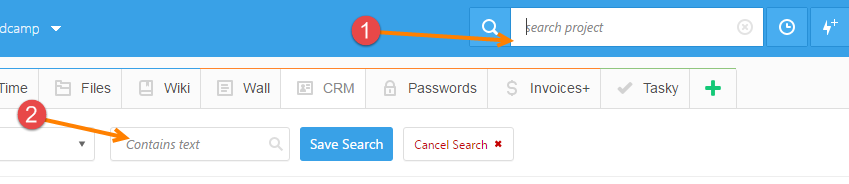
← Back to overview How search works in Freedcamp Igor Kryltsov Productivity October 29, 2016 · 1 min read Share RSS We updated our documentation describing how search works in Freedcamp. Check it out! Start your next project in two minutes Freedcamp is free for unlimited projects, tasks and users. No credit card, no trial clock. Get Started Free See Pricing Comments 3 Cancel replyYour comment *Your name * Your email * Save my name and email for the next time I comment YongBok Jung March 30, 2018 Search under Non English (ex. Korean) is not working! Only the contents written in English are searchable. Pls, check and fix it! (windows 10, chrome). Reply YongBok Jung March 30, 2018 Sorry to bother you. Non English search is working well. I didn’t type enough characters. Reply Igor Kryltsov Author March 30, 2018 We allowed 3 characters search for Chinese – if this is also the case in Korean – please let us know Reply Keep reading Tips & Hints 1 min Place tasks at the top of the list You can now place tasks at the top of the task list with a simple toggle:… Freedcamp 6 min Microproductivity: How to Break Big Tasks Into Smaller Pieces in Project Management We’ve all been there before. You’re starting a huge project, whether it’s a work assignment or a home improvement project, and you … Freedcamp 2 min Introducing Freedcamp’s AI Project Creation Assistant: Your New Project Management Powerhouse Are you tired of the manual work and time-consuming setup that comes with launching a new project? Do you often feel like …
Tips & Hints 1 min Place tasks at the top of the list You can now place tasks at the top of the task list with a simple toggle:…
Freedcamp 6 min Microproductivity: How to Break Big Tasks Into Smaller Pieces in Project Management We’ve all been there before. You’re starting a huge project, whether it’s a work assignment or a home improvement project, and you …
Freedcamp 2 min Introducing Freedcamp’s AI Project Creation Assistant: Your New Project Management Powerhouse Are you tired of the manual work and time-consuming setup that comes with launching a new project? Do you often feel like …



Search under Non English (ex. Korean) is not working! Only the contents written in English are searchable. Pls, check and fix it! (windows 10, chrome).
Sorry to bother you. Non English search is working well.
I didn’t type enough characters.
We allowed 3 characters search for Chinese – if this is also the case in Korean – please let us know