


You can bring tasks from other systems or move your XLS projects to Freedcamp now.
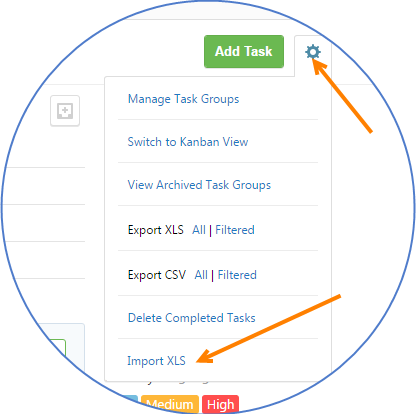
Expand Settings in Tasks application to access Import from XLS.
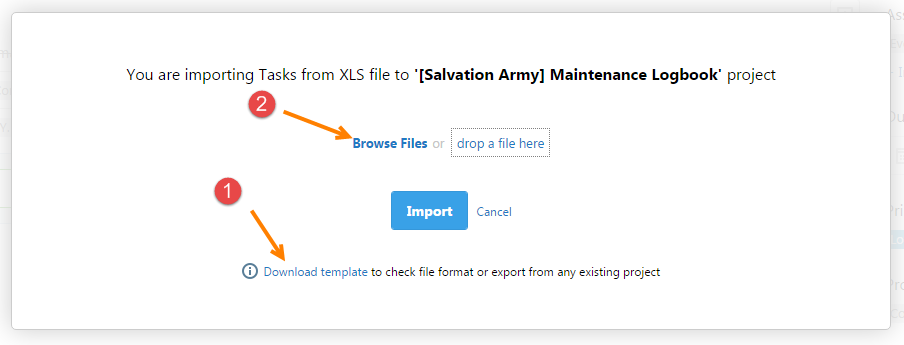
We added an option to download template (1), which is specifically generated to help you to import to this particular project and has all the data you need to make it right from start. Template will contain all users you already have in this project and can use in import file etc. Now you can upload XLS file (2).
Export from one project to import to another one can be used as temporary workaround to copy or move some tasks from one project to another. However, with this approach comments and attached files will not be copied since they are not part of our export XLS file. Native Copy/Move actions, which will support comments and attached files are coming later this year. You can export filtered results for a faster import into another project.
Start your next project in two minutes
Freedcamp is free for unlimited projects, tasks and users. No credit card, no trial clock.
[…] Import from XLS is added. Check for details here […]
Very cool. This solves the problem of structuring a very complicated project, wherein you might have to use Desktop/Tablet/Mobile designations or some kind of colour or copy variations across a large number of tasks.
Not to rain on the parade, but I think the feature requests stands to have “Duplicate Task” or “Duplicate Task Group” within the interface. That way you can set up what you need once and just multiply, without having to go off to Numbers/Excel.
Hi Prescott,
Yes, Copy/Move for tasks and issues is coming later this year. With import we were solving a problem for users coming from other products or Excel world while still providing a workaround for those whose project scope changed while it is already in progress and our Project Templates can not be used. Now you can export relevant tasks from your template project and import it to an existing active project. It is not as perfect as future Copy/Move will be but a solution for many while we don’t have it.
Cheers,
Igor
Please could you give me an update on the rollout of the copy/move function – I’d like to import comments from an internal system and this seems like a possible solution
Hi Peter,
Do you want to import comments for a task?
Help, is there a sample import file somewhere to look at? Yes, I see the template but it’s not liking how I set up my “Type” column.
Hi,
“Type of a task in the following format:
Task
|-Subtask
Only Name (D) is required for subtasks”
So your values in each cell should be either:
Task
OR
|-Subtask
OR
|–Subtask
etc.
If you are not importing subtasks all values in A column should be ‘Task’. If this is not clear please send your file to help@freedcamp.com and we will help.
Cheers,
Igor
Where can I download the import XLS template from?
Hi Amara,
Our documentation answers this question – https://freedcamp.com/Freedcamp_LxR/Freedcamp_Devel_yOf/wiki/wiki_public/view/zxbab#import
Regards,
Igor
I have exported my folders from Wrike an am looking to import into freedcamp however i see an error message that the xls isn’t in the correct format.
I have looked at the freedcamp template and can not work out how to reformat the wrike xls data so that it is compatible.
Advice very welcome
Hi Sarah,
If your file does not contain anything private please send us a file you try to import or, if it contains information you do not want to trust to be sent via email, upload it in some project Files area and email help@freedcamp.com a link to that file so we can capture it from there.
We will be glad to help!
Thanks
Igor